
Explain a benefit
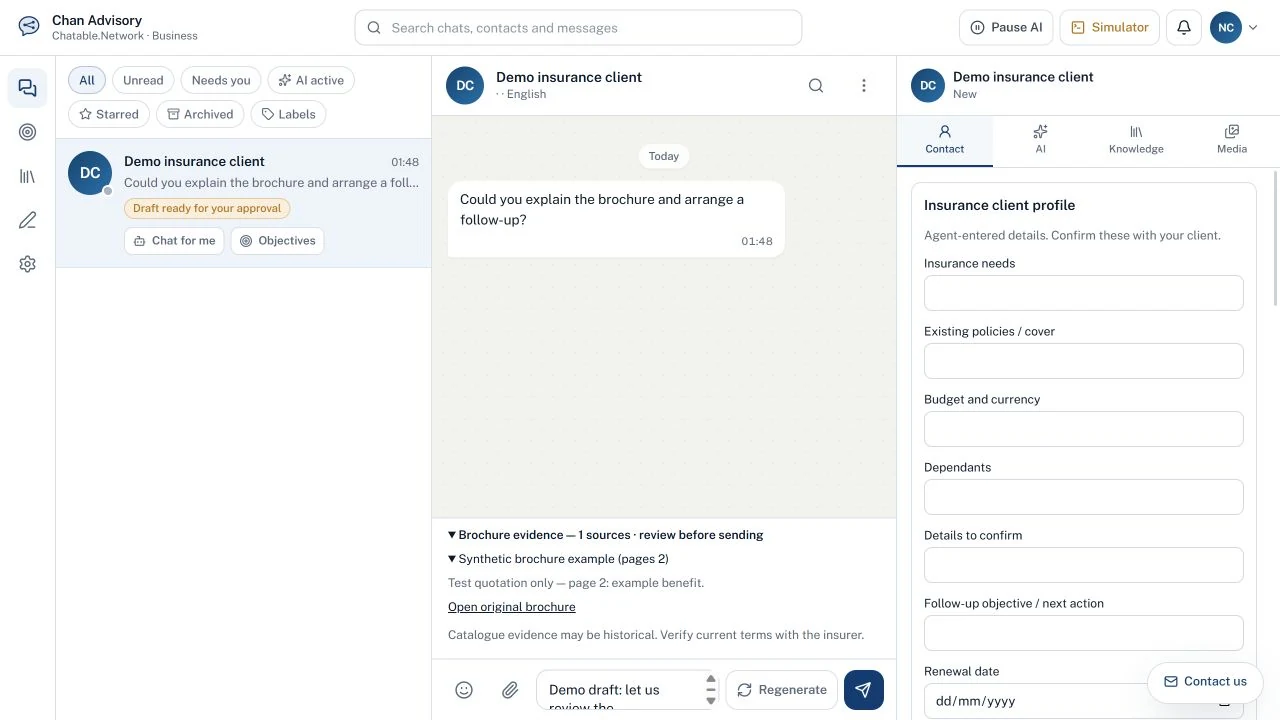
“Help me explain this cover in plain language.” Draft an answer using your selected insurance persona and relevant brochure passages.
For Hong Kong insurance agents
Help clients understand cover, compare their documents and keep the conversation moving—with brochure evidence inside your existing chat workflow.
Opens the existing sign-up / sign-in flow. Choose your insurer, then purchase the seven-day trial. No charge until you confirm payment.
 View full-size demo
Product questions, quotations and follow-ups belong beside your client messages—not in a separate sales portal.
“Help me explain this cover in plain language.” Draft an answer using your selected insurance persona and relevant brochure passages.
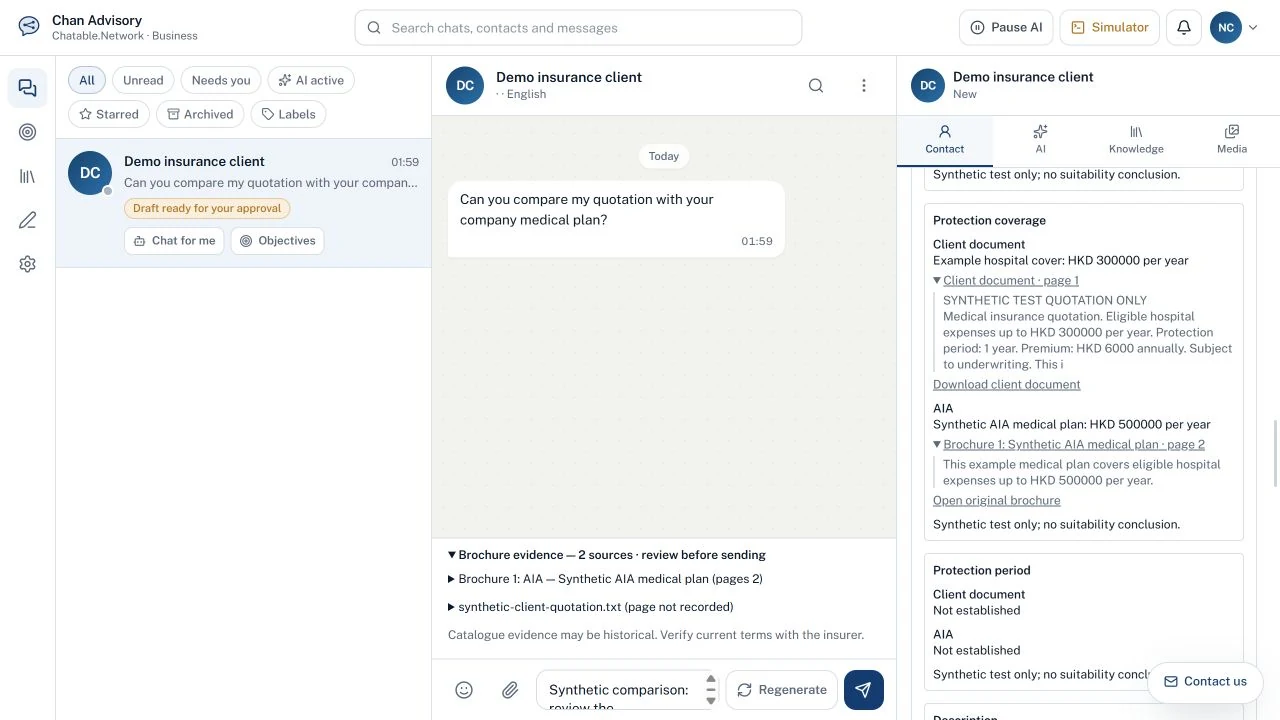
“What is different from our products?” Review a client document against matching company brochures, with missing terms kept visible.
“What should I confirm next?” Keep client needs, renewal dates and the next action in the existing Contact sidebar.
In Persona Settings, choose an insurance agent role, your insurer and optional focus products.
Assign the persona under AI → Role. Use the same chat list, messages and reply composer.
Review proposed wording, brochure quotations and page references. Confirm missing details.
Make the reply your own and send it yourself. Keep the next action in chat Objectives.
Understand your own products, discuss competitors honestly and keep source material within reach.
Retrieve relevant company and competitor brochures. Explain documented strengths, acknowledge trade-offs and show where product facts came from.
Upload a client’s document privately and compare its recorded terms with your selected insurer’s products. See differences in cover, protection period, description and price when evidence is available.
 View full-size demo
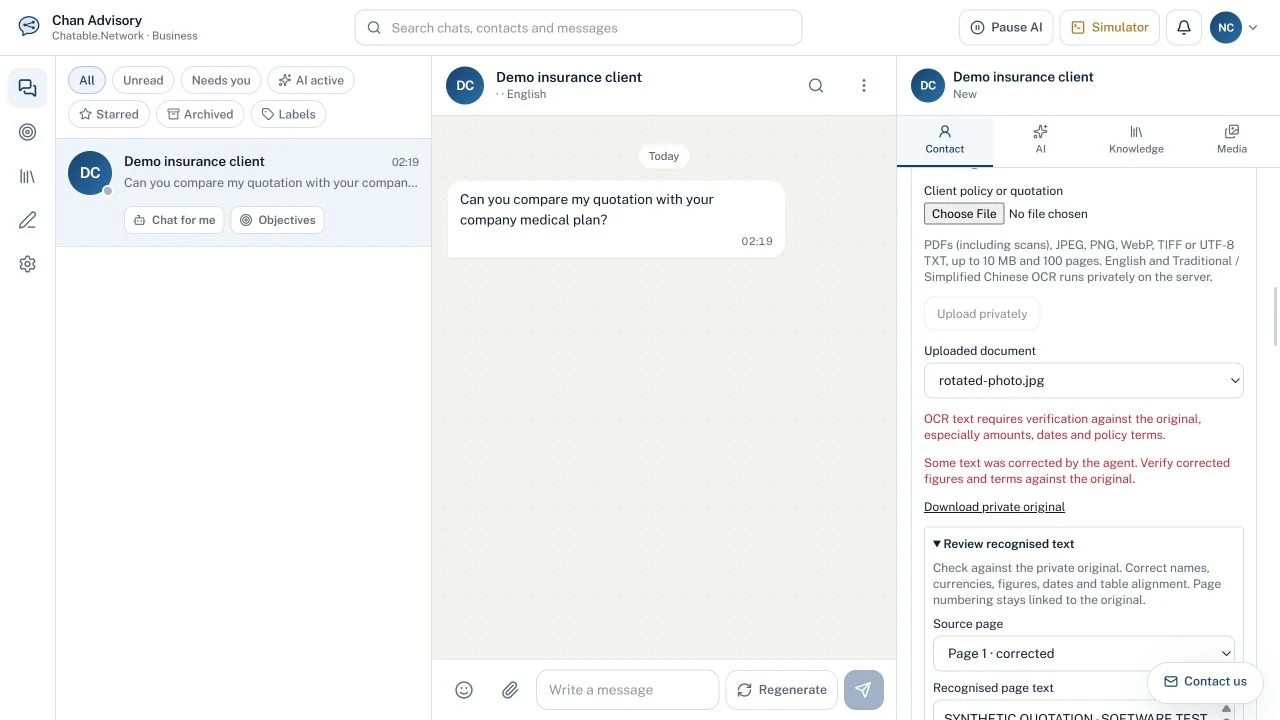
Upload a scanned PDF or supported photo. Server-side OCR reads English, Traditional Chinese and Simplified Chinese, with page progress in the existing sidebar.
 View full-size demo
Record needs, existing cover, budget, dependants, renewal dates and details to confirm. Add follow-ups to the existing chat Objectives.
Uploads stay scoped to the client and workspace, separate from shared brochure knowledge. OCR runs on the server. When you generate a comparison, extracted text is sent to DeepSeek.
Check OCR against the original and verify policy terms and brochure currency. Insurance replies require agent review. This workflow does not send messages automatically.
Insurance agent access, within your existing Chatable account.
USD 5 one-time
Try the complete agent workflow.
USD 20 / month
Keep product knowledge beside your client chats.
USD prices. Insurance reply generation and document comparisons share the reply allowance. Preparing a draft from an existing comparison does not use another reply. The paid USD5 trial can be used once and is not credited towards the monthly plan. Review the terms at checkout.
Yes. The insurance persona can discuss competitor products in the retrieved catalogue and make an evidence-supported case for its own company. It must acknowledge material competitor advantages and unsupported or missing terms.
Yes. Scanned PDFs, JPEG, PNG, WebP and multi-page TIFF are supported, as well as searchable PDFs and UTF-8 TXT. Files are limited to 10 MB, 100 pages and 90,000 extracted characters. Use unlocked PDFs and clear images with the whole page visible.
Review the recognised text against the private original and correct mistakes before confirming it. Confirmation is required for OCR documents before comparison. Confidence scores are not accuracy guarantees. If text changes, generate a new comparison before preparing another draft.
No completeness or current-availability guarantee is made. The catalogue contains indexed brochure records that may be historical. Check the cited original document and confirm current terms and availability with the insurer.
Insurance drafts and comparisons require human review. Preparing a comparison draft places it in the existing composer; it does not send it. Check and edit the wording before sending. Existing messaging restrictions still apply.
Access is restricted to authenticated users in the relevant workspace and client context. Uploads stay separate from shared product knowledge. OCR runs on the server; generating a comparison sends readable document text to DeepSeek. Only upload documents you are authorised to use. See the Privacy Statement for broader service terms.
Create or sign in to your existing Chatable account, set up the insurance persona and choose an insurer. Purchase the USD5 trial through Persona Settings or Settings → Subscription. It provides seven days and 100 AI replies, does not auto-convert and cannot be restarted. The USD20 monthly plan is a separate recurring purchase.
One familiar chat workspace, with product evidence ready when you need it.
Opens the existing sign-up / sign-in flow. Choose your insurer, then purchase the seven-day trial. No charge until you confirm payment.
Product research and drafting support—not personalised suitability, underwriting, claims or policy replacement decisions. Agents remain responsible for checking facts and appropriate advice.